You spent months chasing funds. You pulled all-nighters on set. You sat in front of your NLE until the eyes bled. The color grade is rich, the sound mix is punchy, and the story hits you right in the chest. You export the master file, upload it to FilmFreeway, pay the fee and then wait. Then the email hits your inbox: Sorry to tell you…
That hurts. But the acting was good, and the premise was original, so what went wrong? Most indie filmmakers have no idea how many submissions festival screeners get. Programmers watch dozens of shorts and features back-to-back every single night. They are tired, feeling the pressure, and looking for an excuse to stop watching. If something doesn’t sit right, they leave. That friction, more often than not, comes down to messy subtitles.
Bad captions can ruin a brilliant project, even if your film is in a foreign language or simply has thick regional accents. Why captions are so important, and how to make sure yours help your film rather than hurt it.
Why Subtitles Are Way More Important Than You Think
When you submit to an international festival, you have no idea who is on the selection committee. They may be speaking English as a second or third language. Or the language of your film may be completely foreign to them.
When a programmer hits play, subtitles do three big things:
- They bridge the language gaps: Programmers need to learn emotional cues, jokes and quiet dialogue instantly without stopping the video to rewind.
- Screeners work under poor viewing conditions: Screeners are usually watching movies on a laptop, in a coffee shop or in a loud home office with less-than-perfect audio.
- They display basic respect. Crisp, well-timed subtitles tell the programmer you respect their time and actually care about presentation.
Lose them if a screener has to squint or guess what a character said in the first scene. Watching turns into work when subtitles jump around or blind the viewer.
Common subtitle mistakes that will hurt your submissions
I’ve talked to a ton of festival programmers over the years, and the same pet peeves come up over and over again. To stay in the running, stay away from these:
- Low contrast of text
Plain white text with no dark outline disappears the moment a character walks past a bright window, a white wall or an outdoor daylight shot.
- Bad Timing and delays
Subtitles that cut out a second before the actor speaks totally ruin the punchlines and dramatic reveals. If they are behind, the audience is reading the whole scene instead of watching the performances.
- Walls of Text
If you try to cram a long speech into three giant lines across the screen, you ruin your shot composition and stress out the reader.
- Literal, word-for-word translations
Translating local slang or jokes literally will most likely sound awkward. You need captions that convey the actual mood and intent of the line, not just the dictionary definitions.
- Player Formatting Text Truncated
Exporting with odd frame sizes can easily lead to losing the bottom line of your captions on different screen players.
Easy Rules for Readable Festival Captions
Getting your captions right takes patience, but it’s not rocket science. Here are a few basic guidelines to follow when prepping your festival cut:
- Use short lines: Use no more than 37 to 42 characters in a line, and never more than two lines at a time.
- Use clean fonts: Use simple, easy-to-read sans serif fonts like Arial, Helvetica or Tiresias. Do not use stylized or handwriting fonts.
- Fix your colors. White or light yellow text with a thin black outline or semi-transparent background will work on just about anything.
- Give people time to read: Even a short one-word caption should be on the screen for at least 1.5 seconds, so the human eye has time to catch it naturally.
If you’re racing against a submission deadline, figuring out how to add subtitles to a video using web tools can save you a ton of painful manual labor on your editing timeline. Provides a quick way to generate text, fix timing issues and burn in clean captions without redoing your project from scratch.
Quick Review Before Submitting
Before you spend another dollar on submission fees, run this sanity check on your final video file:
- Watch your film on a phone screen and a laptop at low volume to check if the text is easy to follow.
- Find out if the festival wants hard-coded subtitles (burned in the picture) or a file attached like a .srt.
- Verify that names, locations and technical terms are spelt consistently throughout.
- Do not overlay lower thirds, title cards or critical visual information in the lower third of the frame.
- Get someone who knows nothing about your movie to watch it once. If the captions make them miss a plot point, change them.
Conclusion
On the festival circuit, it’s the little things that matter most. You’ve already done the hard part by actually finishing a movie— don’t let lazy text timing or unreadable fonts stand between you and an official selection. Spend one more night tweaking your captions. It could be the very detail that turns a rejection letter into an acceptance email. You spent months chasing funds. You pulled all-nighters on set. You sat in front of your NLE until the eyes bled. The color grade is rich, the sound mix is punchy, and the story hits you right in the chest. You export the master file, upload it to FilmFreeway, pay the fee and then wait.
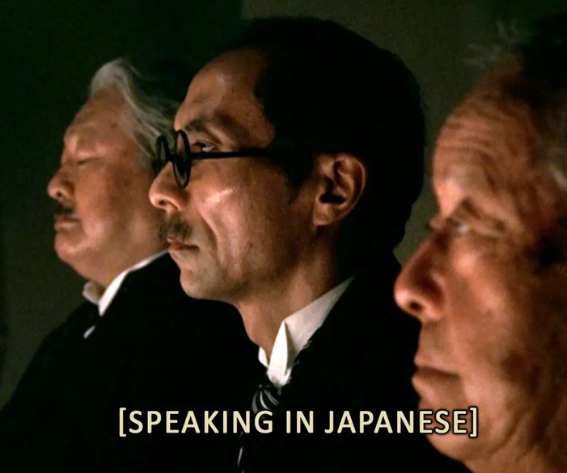
Image source: Reality Has No Subtitles TV Tropes
You may also like:




Leave a reply