
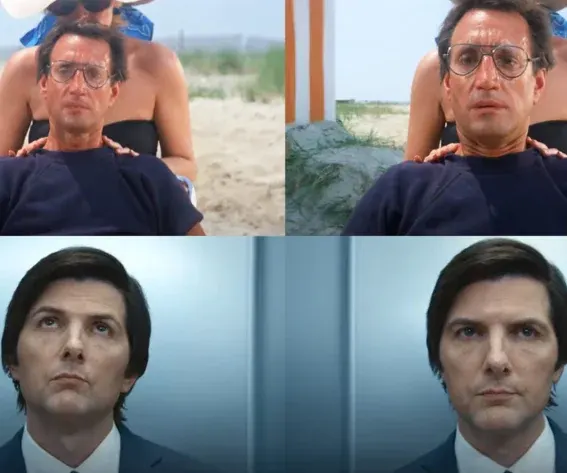
A shot that reads as "AI-generated" rather than cinematic usually comes down to the camera never moving the way a real camera would, a flat zoom instead of a dolly, an orbit shot where the background subtly warps, a dolly zoom that just looks like a regular push-in.
Camera movement is a genuinely different technical problem than character or product consistency: it's about simulating physical camera behavior in 3D space, not holding an identity steady across shots.
This list covers tools specifically strong at reproducing real camera physics and named cinematic effects, rather than general-purpose video generation.
How We Evaluated These Tools
Three things mattered most: whether a tool distinguishes true dolly-style movement (with parallax) from a flat zoom, how reliably it handles named effects like dolly zoom and 360-degree orbit without background warping, and whether camera movement can be applied to a still image or only to existing footage.
The Tools at a Glance
| Tool | Best for | Camera control method | Input |
|---|---|---|---|
| Invideo Agent | Full-scene camera moves with consistency across shots | Named presets (dolly, orbit, jib, track) | Script, brief, or still image |
| Luma Dream Machine | Camera movement and lighting physics fidelity | Cinematic camera engine | Text or image |
| Pika | Motion presets and camera transitions for social content | Preset motion effects | Text or image |
| Kaiber | Photo-to-video camera presets synced to music | Preset zoom, pan, transitions | Still image |
| Genmo | 360-degree camera movement from a single image | 3D-style camera rotation | Still image |
Pricing and feature specs shift quickly in this category, confirm current details on each provider's site before publishing.
Invideo Agent: Best for Full-Scene Camera Moves With Consistency
Invideo Agent applies named camera movement presets, dolly in, pan, tilt, track, jib, 360-degree orbit, that simulate real physical camera paths, calculating depth and parallax automatically rather than simply reframing a flat image the way a basic zoom would.
For a dolly zoom specifically, describing the underlying mechanics, the camera physically dollying back while the lens zooms in simultaneously, produces more reliable results than naming the effect alone, and for orbit shots, pairing the move with a background reference helps prevent the environment from warping mid-rotation. This level of precision is what invideo Agent's motion control system is built for, directing exactly how the camera moves through a scene, rather than leaving movement to chance inside a general text prompt.
Best for: Filmmakers who need camera movement applied consistently across a full scene or sequence, not just one isolated effect shot, with the same character and setting held steady throughout.
Where it falls short: Complex named effects like a dolly zoom still benefit from describing the underlying camera and lens mechanics rather than relying on the term alone to produce a reliable result.
Pricing: Plans start at $17/month, scaling to $900/month for the highest tier, credit-based across all plans.
Luma Dream Machine: Best for Camera Movement and Lighting Physics
Luma's Dream Machine, built on its Ray3 model, leads specifically on camera movement and lighting fidelity, focal length, movement, and light behavior that reads closer to a physical camera capture than most competitors in this category.
Best for: Filmmakers prioritizing the cinematic look and feel of camera movement and lighting above other production considerations.
Where it falls short: Complex or fast-moving scenes can strain the model's physics simulation, occasionally producing messy motion or blended objects during dynamic camera movement.
Pika: Best for Fast Motion Presets on Social-Ready Content
Pika offers accessible, natural-language camera prompting, describing a shot like a slow dolly over a landscape at golden hour, with real-time preview that lets creators iterate quickly without waiting on long renders.
Best for: Creators producing short-form, social-ready content who want quick iteration on camera-style prompts without deep technical setup.
Where it falls short: Positioned more toward playful, viral-style output than the precise, controlled camera work a hero commercial or narrative sequence typically needs.
Kaiber: Best for Music-Synced Photo Animation With Camera Presets
Kaiber converts static images into animated video using prebuilt cinematic camera presets, zoom, pan, shake, and syncs the resulting movement to a music track for rhythm-based content.
Best for: Creators animating photos into short, music-driven clips where camera movement needs to match a beat rather than a narrative moment.
Where it falls short: Motion realism can read as less natural than tools built specifically around cinematic physics, and generated clips are short, limiting use for longer storytelling.
Genmo: Best for 360-Degree Camera Movement From a Single Image
Genmo generates 360-degree camera movements from a still image, producing a dynamic, 3D-style animation from a single input photo across several available animation styles.
Best for: Turning a single product or portrait photo into a dynamic orbit-style shot without needing existing video footage as a starting point.
Where it falls short: Generated clips run short (around 5-6 seconds), and complex prompts can produce inconsistent camera movement across frames compared to a full previz-oriented pipeline.
Which One Should You Use?
Full-scene camera moves with consistency across every shot: Invideo Agent.
The most physically convincing camera movement and lighting: Luma Dream Machine.
Fast iteration on camera-style prompts for social content: Pika.
Music-synced camera presets for photo animation: Kaiber.
A 360-degree orbit shot from a single still image: Genmo.
Common Mistakes When Choosing an AI Camera Movement Tool
- Using "zoom" when a dolly is what's actually needed. A zoom enlarges existing pixels and reads as flat; a dolly simulates real camera movement and parallax.
- Naming a complex effect without describing its mechanics. A dolly zoom benefits from an explicit description of what the camera and lens are each doing, not just the term itself.
- Attempting a 360-degree orbit with no background reference. Without an anchor, backgrounds can warp or lose consistency across a full rotation.
- Picking a music-sync or social-preset tool for narrative camera work. Tools built for rhythm-based short clips aren't optimized for the controlled camera movement a longer narrative sequence needs.
- Assuming every tool handles fast, complex motion equally well. Physics simulation can strain and produce messy results during dynamic, fast-moving camera work, even on strong general-purpose models.
FAQ
What's the difference between a zoom and a dolly in AI-generated video?
A zoom enlarges the pixels already in frame, which often looks flat. A dolly simulates the camera physically moving toward or away from the subject, producing parallax, foreground moving faster than background, that reads as cinematic depth.
Can AI reliably handle a dolly zoom?
Yes, though describing the underlying mechanics, the camera moving back while the lens zooms in simultaneously, tends to produce more reliable results than relying on the term "dolly zoom" alone.
Why do backgrounds sometimes warp during a 360-degree orbit shot?
Without an anchor holding the environment consistent, a model can lose track of what the background should look like as the camera moves around the subject. Providing a reference image of the environment helps prevent this.
Do I need existing footage to apply camera movement, or can I start from a still image?
Several tools, including invideo Agent, Genmo, and Kaiber, can apply camera movement directly to a still image rather than requiring existing video footage as a starting point.
Comments